Bluetooth Mouse For Macbook/macbook Air/pro/ipad Wireless Mouse For
Laptop/notebUSD $14.95
Condition : New
Free Shipping
{{variant_type_name}} :

Notify me when the price drops
We will email you if we find a lower price on this product!
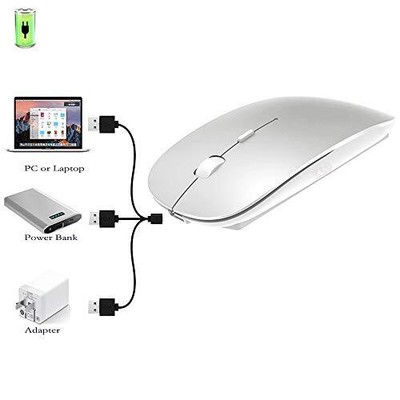
Bluetooth Mouse for MacBook/MacBook air/Pro/iPad, Wireless Mouse for Laptop/Notebook/pc/iPad/Chromebook (Bluetooth Mouse/Silver) ✪✪3DPI SWITCH:Using high-performance optical chips, up to 1600 dpi(800, 1200, 1600) accurately tracking,to meet different needs. ✪✪Adopt bluetooth 3.0/5.2 technology,built-in durable 500mAh Lithium polymer rechargeable battery,high cycle life, The charging time is about 1.5-2.5 hours, lasting use time, the Auto Switch Off function will help you save energy as your bluetooth mouse will switch off when your PC is turned off or the receiver is disconnected. If you do not use the mouse for eight minutes, it will go to sleeping mode, you can press the any button to weak it up. energy saving and extremely low power consumption. ✪✪It is compatible with Mac OS Windows /Win8/10/and is suitable for desktop/ipad/notebook/Mac Macbook Pro/Air(2017/2018/2019/2020/2021) iMac and other devices. ✪✪contoured shape, Ultra Thin and lightweight design, smooth surface ensure maximum comfort and support for your hand even after long working hours, The rubber scroll wheel makes sure that your hand will not slip when scrolling,This bluetooth mouse can meet your demand of daily office working and personal preference. ✪✪To provide you with quality after-sales service: any quality problems within a month can be directly returned or replaced.It is recommended to use the USB port of the computer to charge the mouse, or use a 5V 1A charger, no larger than 5V 1A.
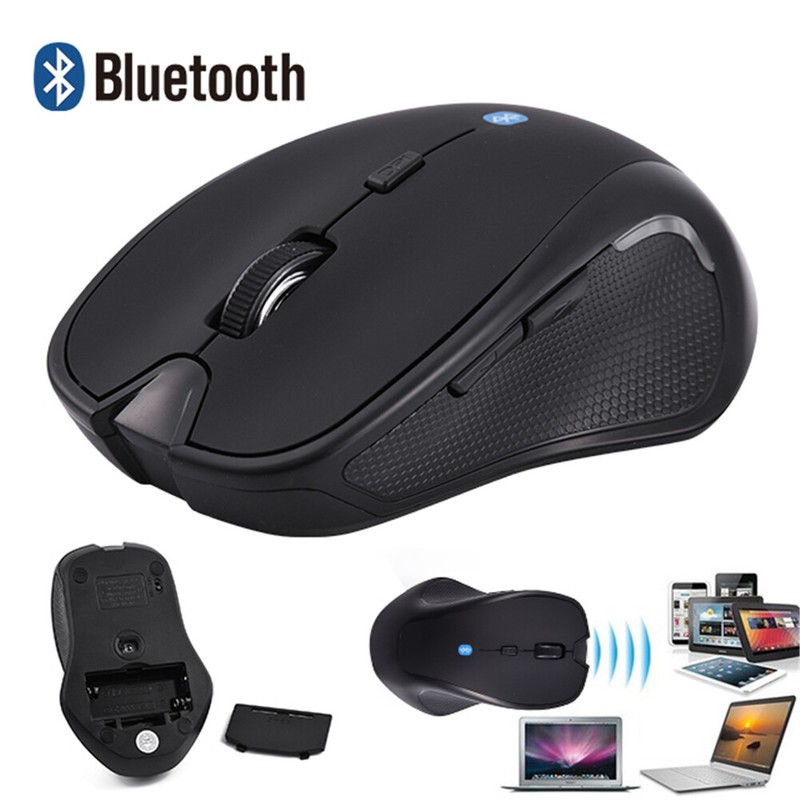
Adopt bluetooth 3.0/5.2 technology, built-in 500mAH A product lithium battery, configuration charging line, like a mobile phone, easy to charge, more scientific, charge and discharge of more than 500 times, the mouse no longer need to buy a battery. size: 113mm x 58mm x23mm weight : 3.2 oz package: Bluetooth mouse x1, USB Charging Cable x1 How to use Bluetooth wireless mouse: Apple Mac MacBook/pro/Air 2012/2013/2014/2015/2016/2017/2018/2019: first, open the mouse switch, open the computer system preferences, open the bluetooth, when the computer Bluetooth display is searching for nearby Bluetooth devices, hold down the mouse button (at the bottom of the mouse small black button) and keep 3 to 8 seconds, and then your computer display the search bluetooth mouse, bluetooth device click on the link, and then the connection is successful Win7/8/10/XP series notebook computer usage instructions: First, open the mouse switch, open the computer settings, open the device Bluetooth function, open add Bluetooth, open Bluetooth, when the computer Bluetooth display is searching for nearby Bluetooth devices, hold down the mouse button (at the bottom of the mouse small black button) and keep 3 to 8 seconds, and then your computer display the search bluetooth mouse, bluetooth device click on the link, and then the connection is successful ShippingWe offer FREE shipping on all orders! We ship within Three business days of payment, usually sooner. We use a selection of shipping services such as UPS, FedEx, USPS etc. We only ship to the lower 48 states, no APO/FPO addresses or PO Boxes allowed. Local pickups and combined shipping options are not provided at this time. Return You can return a product for up to 30 days from the date you purchased it. Any product you return must be in the same condition you received it and in the original packaging. Please keep the receipt. Payment
We accept payment by any of the following methods: PayPal
Please pay as soon as possible after winning an auction, as that will allow us to post your item to you sooner! Feedback
Customer satisfaction is very important to us.
If you have any problem with your order, please contact us and we will do our best to make you satisfied. Contact Us
If you have any queries, please contact us via ebay. We usually respond within 24 hours on weekdays. Thank you for shopping at our store.
Adopt bluetooth 3.0/5.2 technology, built-in 500mAH A product lithium battery, configuration charging line, like a mobile phone, easy to charge, more scientific, charge and discharge of more than 500 times, the mouse no longer need to buy a battery. size: 113mm x 58mm x23mm weight : 3.2 oz package: Bluetooth mouse x1, USB Charging Cable x1 How to use Bluetooth wireless mouse: Apple Mac MacBook/pro/Air 2012/2013/2014/2015/2016/2017/2018/2019: first, open the mouse switch, open the computer system preferences, open the bluetooth, when the computer Bluetooth display is searching for nearby Bluetooth devices, hold down the mouse button (at the bottom of the mouse small black button) and keep 3 to 8 seconds, and then your computer display the search bluetooth mouse, bluetooth device click on the link, and then the connection is successful Win7/8/10/XP series notebook computer usage instructions: First, open the mouse switch, open the computer settings, open the device Bluetooth function, open add Bluetooth, open Bluetooth, when the computer Bluetooth display is searching for nearby Bluetooth devices, hold down the mouse button (at the bottom of the mouse small black button) and keep 3 to 8 seconds, and then your computer display the search bluetooth mouse, bluetooth device click on the link, and then the connection is successful Shipping
We accept payment by any of the following methods: PayPal
Please pay as soon as possible after winning an auction, as that will allow us to post your item to you sooner! Feedback
Customer satisfaction is very important to us.
If you have any problem with your order, please contact us and we will do our best to make you satisfied. Contact Us
If you have any queries, please contact us via ebay. We usually respond within 24 hours on weekdays. Thank you for shopping at our store.
Returns Accepted for this item if it's within 30 Days
Price type
IN STOCK
OUT STOCK





 .
.
